Flip Skater
Miniclip.comSports
4.49.85K Reviews
- Version
- 2.78
- Installs
- 50.00M
- Age Rating
- Everyone
Screenshots
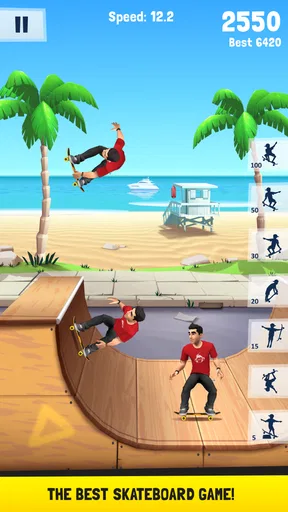

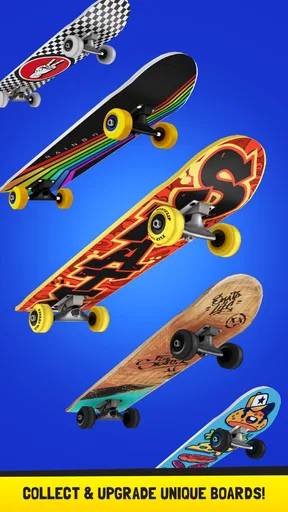
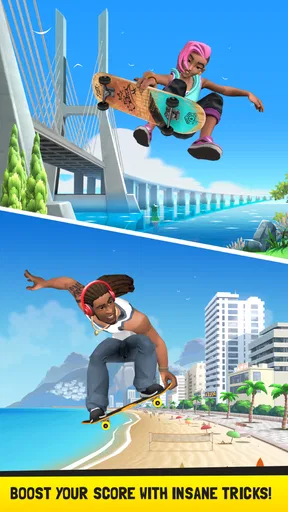
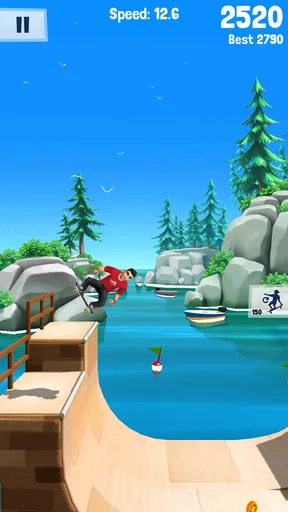
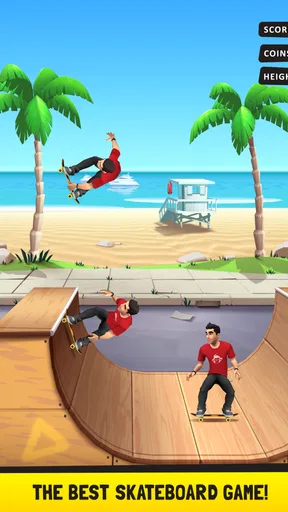

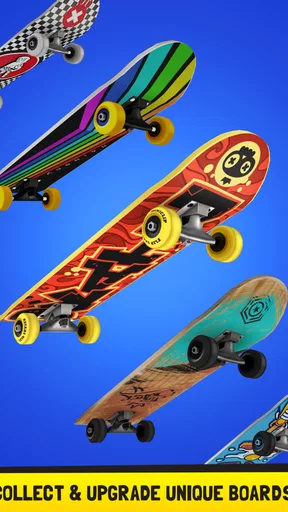
Our Review of Flip Skater
 Analysis by Appyee
I picked up Flip Skater expecting a quick sports game for short breaks, and that is exactly where it works best. It turns skateboarding into a compact, timing-focused experience: you launch a skater, guide the movement, and try to land stylish tricks without turning a simple session into a long commitment. The appeal is immediate, but the better question for a shared phone or tablet is whether it remains enjoyable when several people take turns. In my experience, it does, provided everyone treats it as a pass-and-play game rather than a personal progression space.
Developed by Miniclip.com, this free sports game is suitable for Everyone and runs on Android devices using version 6.0 or later. It has reached over 50 million installs and holds a 4.4 average from around 159 thousand ratings, which matches my impression that it is easy to understand and broadly approachable. I would recommend it to someone who wants quick trick attempts, not to someone looking for a detailed skateboarding simulator with realistic board control, long-form career planning, or a deep multiplayer structure.
How Flip Skater Fits Into Shared, Everyday Play
When I think about sharing Flip Skater, I find its strongest role is a quick, informal challenge rather than a structured competition: players can take turns, watch one another’s attempts, and trade small timing tips without needing a long setup. I’d keep the goal light so a near-miss stays entertaining instead of turning each run into a score dispute. That shared rhythm also makes the game’s visual style and sound worth considering, since they shape how inviting each short session feels.
A good pass-and-play choice for short household breaks
The most natural household scenario is simple: one person has a few minutes before dinner, another wants a turn while waiting, and the device moves between them. Because the core action is easy to recognize, a younger player can understand the objective quickly while an older player can still chase cleaner timing and better-looking combinations. That makes it more useful in a shared setting than a game that requires a long tutorial or a complicated account setup before anyone can enjoy it.
I found the short-session design particularly convenient on a family tablet. One player can attempt a run, hand over the device, and explain one small lesson without forcing everyone else to wait through a lengthy match. The game also creates a natural reason to improve: a failed landing is usually close enough to success that the next attempt feels worth trying. That “one more go” quality is entertaining, although it can also make a supposedly brief break last longer than planned.
The important limitation is that shared enjoyment depends on agreeing on turns. The game is not a substitute for a structured local competition with a clearly defined scoreboard between household members. If your group wants formal head-to-head rounds, private profiles, or a detailed way to separate each person’s achievements, I would choose a game designed around those needs instead. Flip Skater is strongest when the contest stays informal: “Can you beat that trick?” or “Show me how you landed it.”
Why the controls work for mixed experience levels
The control idea is approachable because the player can focus on timing rather than memorizing a large collection of buttons. That matters when a parent, sibling, or friend is trying the game for the first time. I could hand it to someone unfamiliar with mobile sports games and explain the basic goal in a few words. The challenge comes later, when the player tries to make movement, rotation, and landing work together instead of simply completing a basic attempt.
That gradual difficulty is useful in a household with different ages or skill levels. A beginner can enjoy the spectacle of a trick, while a more experienced player can use the same short attempt to refine timing. The trade-off is that the game’s simplicity can feel limiting if you want precise simulation. It presents skateboarding as an arcade activity, so players who care about realistic balance, exact foot placement, or authentic park navigation may find the controls too light.
Making a shared device feel fair
On a shared device, I would establish a small routine before starting. Each person gets a fixed number of attempts, then passes the phone or tablet. That is more reliable than saying “play until you are done,” because the game’s quick retry rhythm makes it easy for one person to occupy the device without noticing. A simple turn order also helps younger players feel that they have a real chance to participate rather than merely watching the strongest player repeat attempts.
Another useful approach is to give each player a different target. One person might aim to land a clean trick, another might focus on trying a new movement, and a third might simply see how far they can progress. This avoids turning every session into a direct skill comparison. It also reflects the game’s real strength: the satisfaction comes from improving control and timing, not only from beating another person.
What to check before handing it over
Although the game is free to download, it includes in-app purchases priced from $1.99 to $14.99 per item. I would not leave purchase decisions to a child using a shared device. The safest household habit is to keep the person responsible for payments involved and to discuss clearly whether the game is being played without spending. That conversation is more useful than assuming that a free download means there will be no purchase prompts or spending decisions during play.
I also recommend checking the device’s general purchase settings before letting several people use the game. I am not treating that as a special Flip Skater feature; it is simply sensible housekeeping for any free-to-start mobile game. On a family phone, the main boundary is often not the game itself but who can approve a transaction. Keeping that boundary clear prevents a casual trick session from becoming an unexpected account problem.
Account boundaries and the meaning of progress
A shared device creates another practical question: whose progress is being used? If several people play through the same installation, they may be looking at the same game state rather than separate personal journeys. I would therefore avoid treating the device as a collection of private player profiles unless you have independently confirmed that arrangement in your own setup. For casual turns, this is not a serious issue. For a child who cares deeply about personal achievements, it can become frustrating if another player changes the visible progress or unlock path.
My solution would be to keep the game in the “shared challenge” category. Let everyone contribute to a household record or simply celebrate memorable attempts instead of promising that each person has a protected career. If personal ownership matters more than quick access, a separately managed device or a game with clearly separated profiles will be a better fit. This is one of the biggest differences between enjoying Flip Skater together and using it as someone’s main personal game.
Coordinating turns without making the game feel like homework
Coordination works best when it stays lightweight. I would use a short rotation and let players call out what they are attempting before each run. Saying “I am trying to land this rotation” gives spectators something specific to watch and gives the player a clear goal. It also turns failure into useful feedback: instead of simply saying the attempt was bad, the next player can point out whether the timing looked early or late.
This kind of coaching is one of the less obvious strengths of the game. Because the action is visually immediate, a person watching can often understand the mistake even without playing. That makes it suitable for a parent and child to share, especially when the adult wants to help without taking over the controls. The advice should remain encouraging, though. Repeatedly correcting every attempt can make an arcade game feel like practice, and the game is more enjoyable when experimentation is allowed.
For a group, I would avoid arguing about who performed the “best” trick unless everyone agrees on the standard. A difficult-looking move may fail while a simpler one lands cleanly. That difference creates a useful household rule: reward successful control as well as ambition. It keeps the strongest player from dominating the conversation and gives beginners a reason to keep trying.
Age context: approachable does not mean automatic supervision
The Everyone rating makes the game an accessible option for a broad age range, and I found the presentation easier to introduce than a title built around intense competition or complicated themes. Still, age suitability is only one part of a shared-device decision. Younger players may need help understanding the difference between in-game progress and real spending, while older children may want more independence around the device and the account attached to it.
I would explain three things before handing over the phone: what the goal is, how turns will work, and whether purchases are allowed. That short explanation sets expectations without making the game sound risky or complicated. It is especially helpful when the device belongs to an adult but is used by several people, because the player may not realize that tapping a purchase option affects the account holder rather than the game session alone.
Trust also matters. If a child is playing alone on a personal device, the conversation can focus on spending and screen time. If the game is on a shared family tablet, the conversation should include respect for other people’s turns and progress. Flip Skater does not need to become a household dispute simply because it is easy to replay; a clear agreement before starting usually solves most of the friction.
Where it stands beside other sports games
Compared with a realistic skateboarding game, Flip Skater is faster to learn and less demanding in terms of controls, but it offers less simulation depth. Compared with a traditional sports title built around full matches, it removes the waiting, team management, and longer commitment. That makes it a better choice for a quick break, while a football, basketball, or racing game may be better when a group wants a complete competitive session with a clear beginning and end.
It also differs from endless arcade games that rely mainly on avoiding obstacles. Here, the satisfaction is tied more closely to attempting a trick and judging the landing. That gives skilled players something to refine, but it can feel repetitive if the player does not enjoy repeating similar actions to improve timing. I would choose it for someone who likes practice-based arcade challenges and skip it for someone who needs a strong story, social structure, or constant change.
Small techniques that improve the experience
My first practical tip is to watch the whole attempt instead of reacting only to the moment a trick begins. The landing is where a promising run becomes a successful one, and rushing the final input is an easy way to turn a good setup into a miss. In a shared session, asking the player to describe what they saw after the attempt is more useful than immediately grabbing the device and trying to repeat it.
My second tip is to use failed runs as experiments. Change one part of the timing at a time rather than making several adjustments together. That gives the player a better sense of what caused the miss and prevents random tapping from becoming the main strategy. This is especially valuable for children, because it turns repetition into a small lesson about cause and effect without requiring formal instructions.
My third tip is to keep purchase decisions separate from performance goals. A player who is struggling with a landing may assume that an item will solve the problem, even though better timing can be the more satisfying answer. I would first spend time learning the controls and deciding whether the game remains enjoyable without buying anything. If the free experience already works for the household, there is no reason to turn every session into a spending discussion.
Performance, compatibility, and practical expectations
The current version is 2.78, and the minimum Android requirement is version 6.0. That makes compatibility fairly broad for Android users, but I would still check the device before installing, particularly if the phone is old or shared by several people. A game can be suitable for the operating system and still feel less comfortable on a small screen, a heavily used tablet, or hardware with limited remaining storage.
Since the game is free, trying it is relatively easy, but I would judge it by the kind of play it encourages rather than by the download decision alone. It is a good low-commitment choice when the household wants something immediately understandable. It is less convincing as a long-term centerpiece if everyone expects separate progress, deep customization, or a substantial competitive system.
Who should choose it, and who should pass
I think Flip Skater is a strong match for casual sports fans, children who enjoy trick-based challenges, and families looking for a game that can be passed around during short breaks. It is also suitable for someone who likes improving through repetition and does not mind restarting after an imperfect landing. The approachable controls make it easy to demonstrate, while the timing challenge gives experienced players a reason to keep practicing.
I would be more cautious recommending it to players who dislike retries or who want a complete skateboarding simulation. It is not the right pick for a household that needs strict separation between multiple players’ progress, nor for anyone who wants a formal local multiplayer competition. Players who are sensitive to in-app purchase prompts should also decide in advance whether the free version is enough for them and keep payment approval with the account owner.
My household verdict
After spending time with it, I see Flip Skater as a friendly shared-device game rather than a private, long-form sports hobby. Its best use is a short rotation where people attempt tricks, exchange tips, and laugh at near-misses. The Everyone rating and simple entry point help mixed-age groups get started, while the timing challenge prevents it from feeling completely empty after the first attempt.
The boundaries matter more than they might with a one-player toy. Agree on turns, be clear about purchases, and treat progress carefully when several people use the same installation. Those steps address the main household friction without taking away the fun. I would recommend giving it a try if your group wants quick skateboarding action and informal cooperation around a single device.
My final recommendation is positive but specific: choose it for accessible arcade trick play, not for realism or account-heavy competition. Miniclip.com has made a game that is easy to pass to another person and hard to master immediately, which is a useful combination for family downtime. If that balance sounds right, the free download makes it a sensible experiment; if your priority is private progression or a complete sports simulation, another category of game will serve you better.
Verdict
Strengths of Flip Skater
- Simple controls make it easy for beginners to start playing.
- Short levels are ideal for quick gaming sessions.
- Trick variety keeps runs engaging as skills improve.
- Character and board upgrades add a sense of progression.
- Bright visuals and smooth animations suit the casual style.
Limitations of Flip Skater
- Progress can feel repetitive after playing the same locations often.
- Some upgrades and items may require considerable grinding.
- The physics occasionally produce awkward landings or failed tricks.
- Ads can interrupt the experience, especially after completed runs.
- Advanced tricks take practice and may feel difficult for new players.
Other Releases by Miniclip.com
View All
8 Ball Pool
Sports4.8

Carrom Pool: Disc Game
Sports4.4

Pure Sniper: Gun Shooter Games
Action4.8

Football Strike: Online Soccer
Sports4.8
Similar Picks in This Category
View All8 Ball Pool
Miniclip.com4.8

Pooking - Billiards City
AIM TOP GAME TECHNOLOGY LIMITED - pool4.6
Carrom Pool: Disc Game
Miniclip.com4.4

EA SPORTS FC Soccer Mobile 26
ELECTRONIC ARTS4.6

World Soccer League
mobirix4.3

Soccer Cup 2026: Football Game
INLOGIC SPORTS - football tennis golf soccer4.3
Frequently Asked Questions
What is Flip Skater and how does the gameplay work?
Flip Skater is an arcade sports game focused on performing skateboard tricks from ramps and half-pipes. You launch your character into the air, control spins and flips, and try to land safely to earn points. The controls are designed for mobile devices, so timing and simple swipes are more important than complicated button combinations. Each successful landing helps you progress and improve your trick score.
Is Flip Skater free to download and play?
Flip Skater can generally be downloaded and played for free, although the game may include optional in-app purchases. These purchases can provide cosmetic items, upgrades, or other conveniences, depending on the current version. You can enjoy the basic gameplay without paying, but progression may include advertisements or limits that encourage optional purchases. Always check the store listing for the latest pricing and availability.
Does Flip Skater require an internet connection?
Flip Skater is primarily suitable for quick, casual play, and many of its core skating activities can usually be enjoyed without a constant internet connection. However, an internet connection may be required for advertisements, in-app purchases, updates, online features, or restoring progress. If you plan to play offline, it is best to open the game once while connected and confirm which features remain available.
Is Flip Skater appropriate for children and new players?
Flip Skater is easy to understand and generally accessible to beginners because its controls are straightforward and the gameplay is based on short attempts. Younger players can learn the basics quickly, although mastering timing and landing tricks may require practice. Parents should still review the game’s advertising and in-app purchase settings, especially if the application will be used on a shared device.
What are the main advantages and drawbacks of Flip Skater?
The main advantages of Flip Skater are its simple controls, fast rounds, trick-based gameplay, and entertaining arcade style. It works well for players who want a game that can be played for a few minutes at a time. On the other hand, the experience may become repetitive for users seeking a deep skateboarding simulator, and advertisements or progression limits can affect the overall pace for free players.
Play our best games!


